So now you've purchased your V3. What do you need to do next?
V3 must be registered to our website and it also needs to be installed to your computer.
This is HOW!
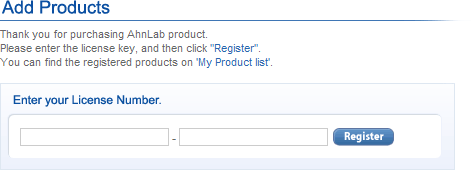
After purchasing V3, you will receive a mail from Element 5; including a 16 digit serial number. To proceed,
you need that serial number.
Move to menu `Support > Product Registration`. If you already have an account at global.ahnlab.com, log-in to your
account and move to [Product Registration], and register your 16 digit serial number.
If you don't, agree to the [Terms of Use] and make a new account.
If you have proceeded through STEP #2, you have successfully registered your product.
To install V3 to your computer you need an installation file. Unlike other software providers who charge you for installation
file downloads, AhnLab provides you with your installation file for free until your expire date.
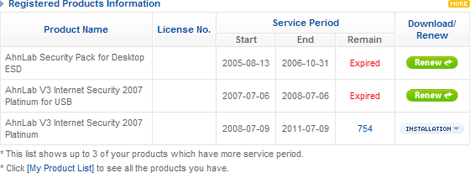
Log-in to your account and move to [My Page]. In the middle you will see your registered product & service period.
If your product hasn't expired you will see the 'Installation' button, which you can download the installation file.
If your product has expired, you will see a 'Renew' button instead.